

Dm Play
Dm Play file, shortcut and update guide: what public screens show, what they cannot prove, and which evidence matters before an installation.
Dm Play file and access guide
Looking for the Dm Play APK? This entry does not currently supply a matched installer. It helps you tell a real Android package from a website shortcut, evaluate the source you found and decide whether an update belongs to an existing installation. It does not send you to a different app when a Dm Play file is unavailable.
Which Dm Play does this page mean?
The supplied directory icon is a black/red rounded square with red-and-gold DmPlay lettering, a lotus containing a white spade and a gold swoosh. The public image at dmplay.app uses a similar joined wordmark and lotus/spade on a pale patterned background, without that black/red surround. These are recognisable visual similarities, not identical artwork or proof of common ownership.

On review, dmplay.app returned a JavaScript application shell titled “DmPlay Official – Entertainment & Rewards Platform”. The title is the site’s own assertion. It does not establish its legal operator, identify an APK signer or connect every DmPlay-named domain to one service. We use Dm Play as the display name and DmPlay as a search spelling, not as a blanket endorsement of matching domains.
A download icon and “Add to Desktop” are not the same evidence
The home-screen image published by tpplayofficial.in shows a cloud/download symbol near the upper right and a separate “Add to Desktop” overlay lower down. It also contains a download-reward banner. This is a third-party screenshot, not our live account test: it shows that both prompts were pictured, but does not reveal the file behind the cloud button or prove a reward is available now.
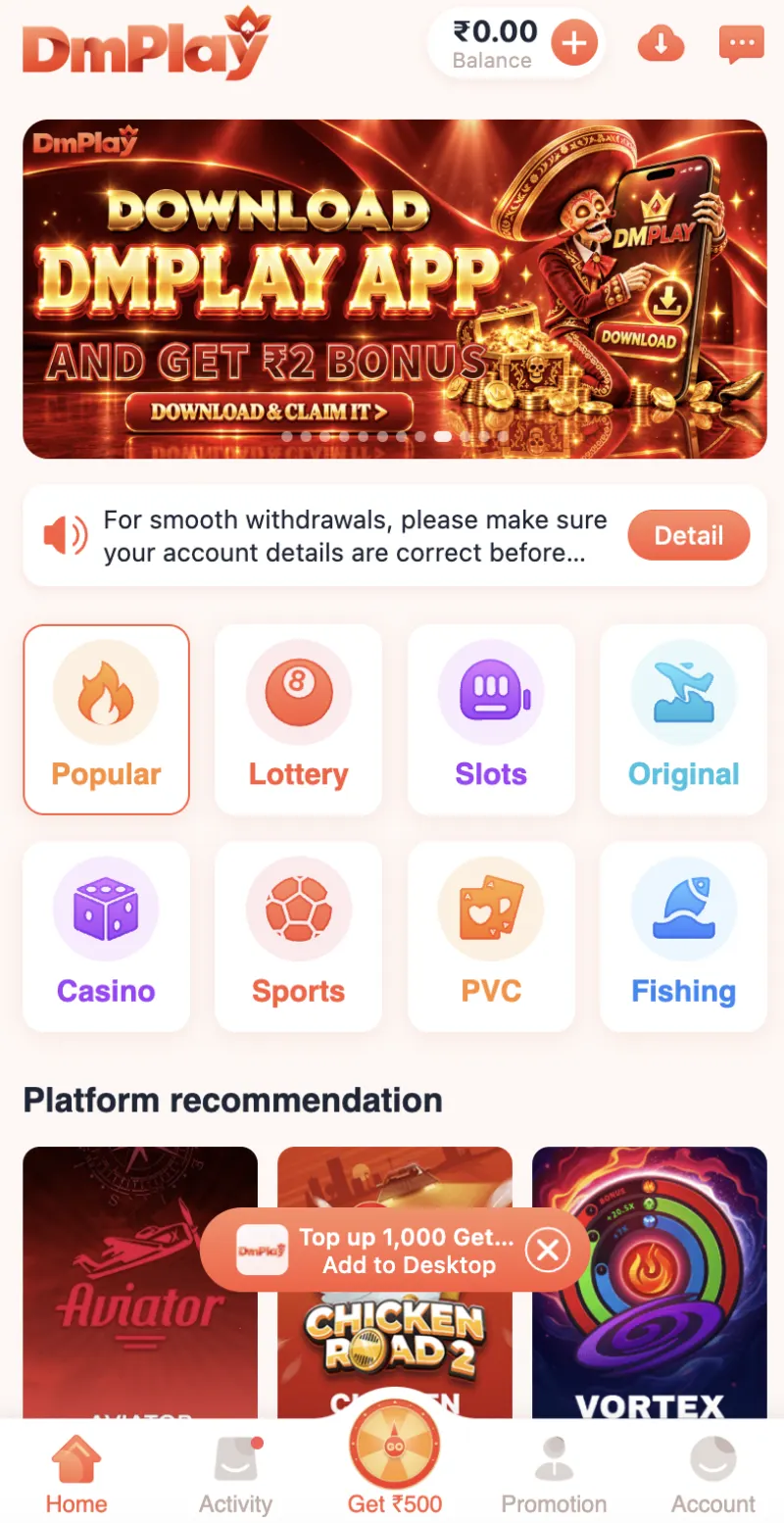
That distinction resolves a common search problem: a home-screen icon can launch a website, a web app or an installed Android package. Its appearance alone cannot tell you which. Browser-based access also uses storage/cache; it is not necessarily “zero storage”, as some comparison copy implies.
Choose the branch that matches what you actually received
- Only a link or a home-screen shortcut? Check whether it opens a browser or web-app view. Do not record it as an APK release. On iPhone, an Android APK is not an iOS installer; a saved website shortcut does not change that.
- A file downloaded, but nothing is installed yet? Keep its source address and filename. A file called
dmplay.apkcan be renamed by anyone; a saved HTML page or ZIP is not made into an APK by renaming it. Read Android’s installer identity and warnings before proceeding. - An app is already installed and you received an update? Compare the actual application/package identity, not just the logo. Android normally enforces signing continuity for an in-place update. An unexplained refusal is a reason to investigate, not to remove the old app and force a new one.
- You need a ready-to-install file immediately? This page cannot supply one with an established Dm Play identity. Do not substitute another directory app or use a “mod/hack” file to fill that gap.
A small source-to-build record that makes the next update easier
Keep these notes locally; no account password, OTP or payment information belongs in them:
- Source: the page address, final file address if available, and date obtained. A redirect to a different brand breaks the chain until explained.
- Installer: the displayed app name and any package/version information actually shown. Do not fill gaps from a similarly named website.
- Existing copy: its app-info name and version, if installed. Do not assume an uninstall preserves local data.
- Optional advanced inspection: a reputable offline APK tool can expose the package ID, version code and signing certificate. A filename or a hash without an independently trusted reference does not establish authenticity. Do not upload private account data to perform this check.
Illustrative decision, not a Dm Play release: two files can show the same icon while carrying different package identifiers. Treat them as separate applications until a documented migration connects them. Conversely, a larger file is not automatically a newer build; compare release evidence and version codes, not size alone.
When an install or update should pause
- “App not installed” or an update rejected
- The message can have several causes: incompatibility, a damaged file, insufficient space or a signing/package conflict. Record the exact message; don’t diagnose all failures as a signature problem.
- A warning asks you to disable protection
- Keep Play Protect enabled where supported. Do not grant Accessibility, Device administrator access or an unexplained helper installation simply to get past a block.
- A source says “latest” but offers no release trail
- Ask what links that file to the intended service and existing app. An upload date, matching logo or successful installation is not a safety certification.
If you independently establish a file’s identity and choose to install it, Android may request permission for the specific browser/file manager involved. Revoke that source’s install permission afterwards. This is general Android guidance, not a tested Dm Play installation sequence. See the site’s Android setup and file-report checklist for the broader process.
Why this listing does not print a “latest version” card
The guides reviewed disagree: dmplayapp.com claims approximately 15 MB and Android 5.0+, whereas dmplaygame.com’s installation section describes approximately 14 MB. Neither provides a measured file-to-signer match established in this review. Those numbers are competing claims, not Dm Play specifications adopted by this directory or evidence that one is a newer release.
Reviewed 9 November 2026 (Asia/Shanghai). Evidence here consists of the supplied icon, the public page/image and attributed third-party material linked above. No account, APK, game session, payout or malware scan was tested. Version, size, Android minimum and download totals therefore stay out of the technical card and schema. Before using any money feature, separately establish current legal eligibility and operator terms; an install is not a payment-service endorsement.
If you meant another app
Spin 101 and Rummy Culture are separate directory entries, not alternate Dm Play files. Use their own identity evidence only if their names match your intended app. This avoids turning a spelling search into an unrelated installation.
FAQs
Can I download the Dm Play APK from this page?
No. This entry does not have an installer with an established Dm Play identity. It provides a file-versus-shortcut decision path and does not substitute another application.
Does Add to Desktop mean the APK is installed?
No. The published screenshot shows a desktop prompt separately from a download symbol. A home-screen icon can launch web access; the screenshot cannot establish the file or package behind either action.
Is the supplied black/red icon identical to dmplay.app artwork?
No. They share recognisable wordmark and lotus/spade elements, but the supplied icon has a different black/red surround and gold swoosh. Visual similarity does not prove domain ownership or a package signer.
Why are the version and APK size not listed as app facts?
The live guides reviewed make different file-size claims, and this review has not connected either claim to an independently identified package and signer. A claim on a guide page is not a measured release.
Should I uninstall an existing copy if an update fails?
Not simply to force an unexplained update. Keep the exact error and source information first. Several causes are possible, and uninstalling may remove local data or bypass a useful identity check.
Need help with this listing?
Ask about an identity detail or the file decision path. Do not send passwords, OTPs or payment details.
Ask about Dm Play